# 开发文档
跨境电商Shopline平台对接SendCloud开发文档。
后端技术栈:Java Springboot +Mysql
前端技术栈:Html+Vue.js
# 名词
# Shopline
全球跨境电商建站平台。 Shopline官网 (opens new window) 开发文档 (opens new window)
# SendCloud
航运自动化平台。使用单一 API (RESTful) 向任何商店、WMS、ERP 或市场添加完整的运输功能,而无需担心个别承运人的要求和更新。 SendCloud官网 (opens new window)开发文档 (opens new window)
# 用例
- 用户用电脑在Shopline后台,使用SendCloud应用对订单进行物流发货
- 用户用电脑在Shopline后台,使用SendCloud 应用获取订单物流状态。
- 用户用电脑在Shopline后台,使用SendCloud 应用对订单进行物流退货。
- 用户用电脑在Shopline后台,使用SendCloud 应用计算订单物流运费。
# 开发规划
| 规划 | 开发内容 | 时间 |
|---|---|---|
| 一期 | 物流发货、物流状态获取 | 2023-02 至 2023-03 |
| 二期 | 物流退货、计算订单物流运费 | 时间待定 |
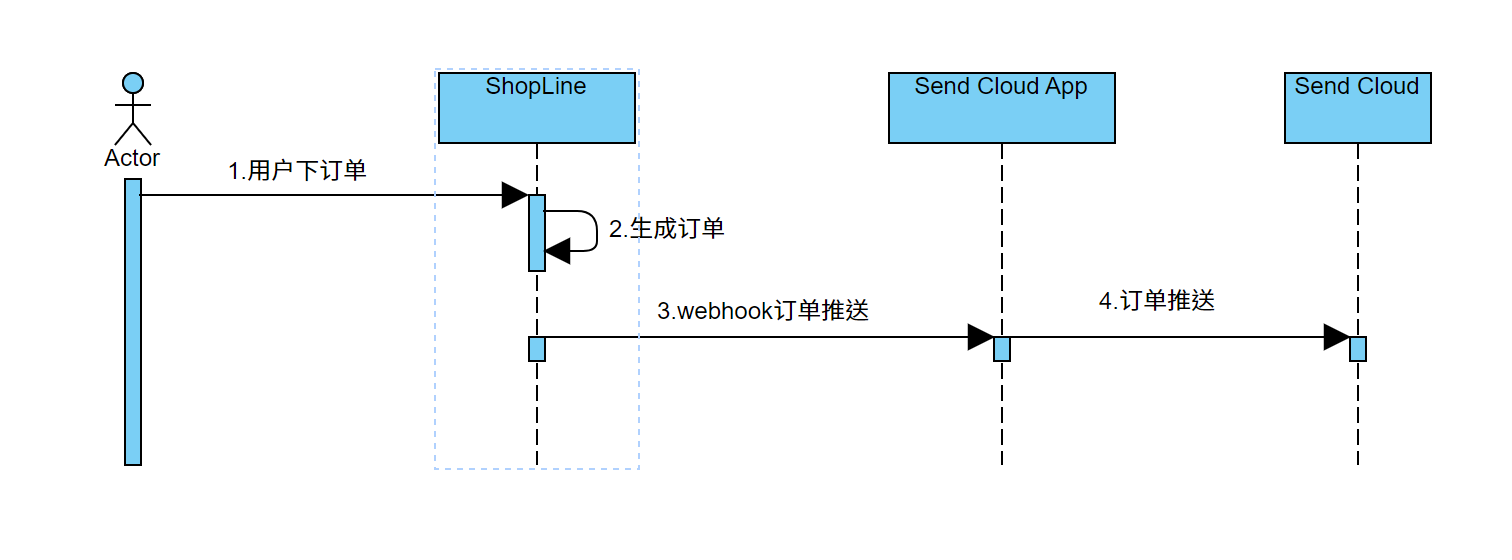
# 业务流程
# 原型地址
原型地址 (opens new window) 请查看《SendCloud》,访问密码:888
# 流程
安装配置流程、订单物流发货流程、获取订单物流状态
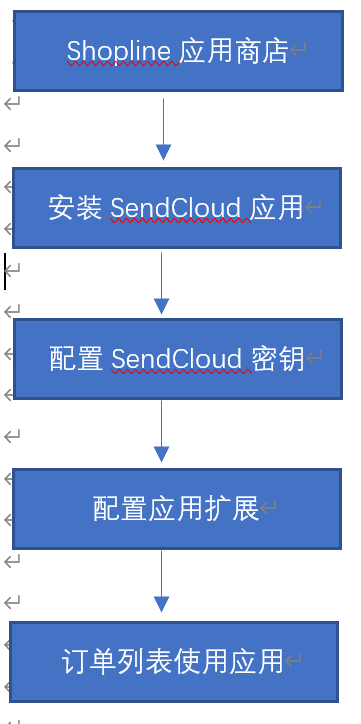
# 安装配置流程
用户在shopline平台安装sendcloud应用后,需要按照下面流程进行配置
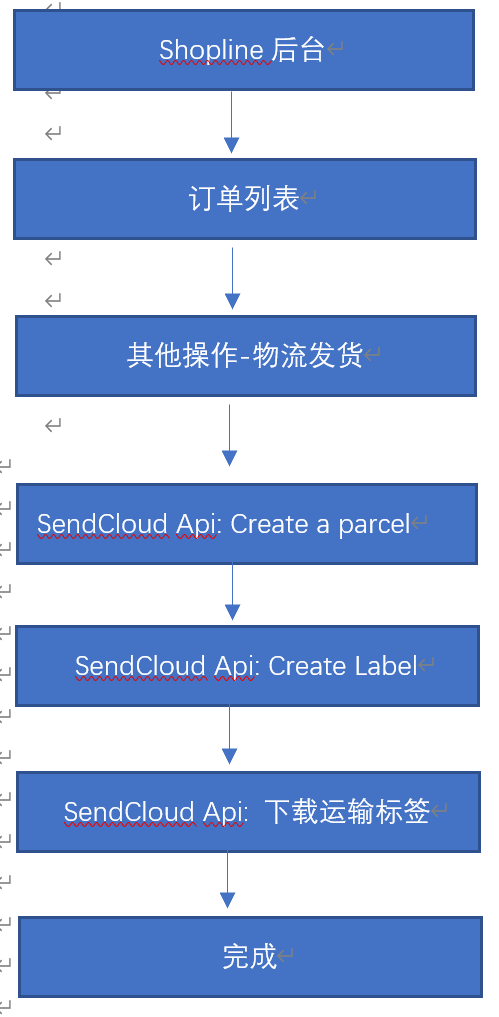
# 订单物流发货
使用sendcloud接口创建物流包裹
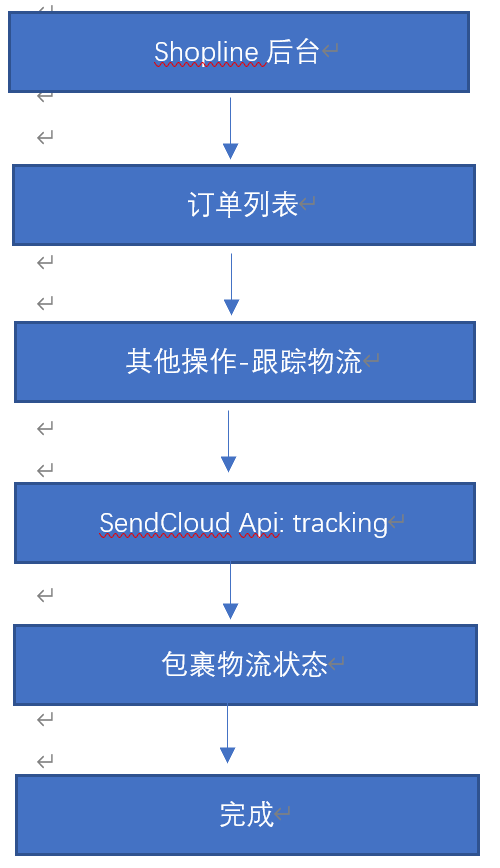
# 获取订单物流状态
使用sendcloud接口获取物流包裹状态
# Api 接口
# parcels
Api功能:创建一个运输包裹 Create a parcel (opens new window)。
Api请求方式:post
Api地址:https://panel.sendcloud.sc/api/v2/parcels
Api参数:
{

  "parcel":
    {
            "name": "John Doe",
            "company_name": "FlowerShop",
            "email": "john@doe.com",
            "telephone": "+31611223344",
            "address": "Fürstenrieder Str.",
            "house_number": "70",
            "address_2": "",
            "city": "Munich",
            "country": "DE",
            "postal_code": "80686",
            "country_state": null,
            "integration_id": 116118,
            "to_service_point": 10168633,
            "to_post_number": 262373726,
            "customs_invoice_nr": "",
            "customs_shipment_type": null,
            "parcel_items":
            [
                {
                    "description": "T-Shirt",
                    "hs_code": "6109",
                    "origin_country": "SE",
                    "product_id": "898678671",
                    "properties":
                    {
                        "color": "Blue",
                        "size": "Medium"
                    },
                    "quantity": 2,
                    "sku": "TST-OD2019-B620",
                    "value": "19.95",
                    "weight": "0.9"
                },
                {
                    "description": "Laptop",
                    "hs_code": "84713010",
                    "origin_country": "DE",
                    "product_id": "5756464758",
                    "properties":
                    {
                        "color": "Black",
                        "internal_storage": "2TB"
                    },
                    "quantity": 1,
                    "sku": "LT-PN2020-B23",
                    "value": "876.97",
                    "weight": "1.69"
                }
            ],
            "weight": "3.49",
            "length": "31.5",
            "width": "27.2",
            "height": "12.7",
            "total_order_value": "896.92",
            "total_order_value_currency": "EUR",
            "shipment":
            {
                "id": 1316,
                "name": "DHL Parcel Connect 2-5kg to ParcelShop"
            },
            "shipping_method_checkout_name": "Battery WarehouseX DHL",
            "sender_address": 1,
            "quantity": 1,
            "total_insured_value": 0,
            "is_return": false,
            "request_label": false,
            "apply_shipping_rules": false,
            "request_label_async": false
        }
}
# 字段映射:
| SendCloud | Shopline | 备注 |
|---|---|---|
| name | name | |
| company_name | company | |
| customer.email | ||
| telephone | customer.phone | |
| address | addresses.address1 | |
| house_number | ||
| address_2 | addresses.address2 | |
| city | addresses.city | |
| country | addresses.country | |
| postal_code | addresses.zip | |
| country_state | addresses.country | |
| integration_id | ||
| to_service_point | ||
| to_post_number | ||
| customs_invoice_nr | ||
| customs_shipment_type | ||
| parcel_items | [] | |
| weight | total_weight | |
| length | ||
| width | ||
| height | ||
| total_order_value | ||
| total_order_value_currency | currency | |
| shipment | {} | |
| shipping_method_checkout_name | ||
| sender_address | ||
| quantity | ||
| total_insured_value | ||
| is_return | ||
| request_label | ||
| apply_shipping_rules | ||
| request_label_async |
# parcel_items 字段映射:
| SendCloud | Shopline | 备注 |
|---|---|---|
| description | fulfillments.line_items[i].name | |
| hs_code | fulfillments.line_items[i].id | |
| origin_country | ||
| product_id | fulfillments.line_items[i].product_id | |
| properties | [] | |
| quantity | fulfillments.line_items[i].quantity | |
| sku | fulfillments.line_items[i].sku | |
| value | ||
| weight | fulfillments.line_items[i].grams |
# properties 字段映射:
| SendCloud | Shopline | 备注 |
|---|---|---|
| color | fulfillments.line_items[i].attribute | |
| size | fulfillments.line_items[i].attribute |
# Create the shipping label
Api功能:创建包裹物流标签
Api请求方式:put
Api地址:https://panel.sendcloud.sc/api/v2/parcels
Api参数:
{
    "parcel":
    {
        "id": 1,
        "request_label": true,
        "name": "Mr Test",
        "shipment":
        {
            "id": 8,
            "name": "unstamped letter"
        }
    }
}
# Download the shipping label
Api功能:下载创建的物流标签,用户可打印。PDF格式。普通打印机提供A4尺寸,标签打印机提供A6尺寸。
Api请求方式:GET
Api请求地址:https://panel.sendcloud.sc/api/v2/labels/normal_printer/1?start_from=0
# Tracking parcels
Api功能:跟踪物流包裹最新物流状态。
Api请求方式:Get
Api地址:https://panel.sendcloud.sc/api/v2/tracking/JVGL06097547000198007881
Api参数:tracking_number